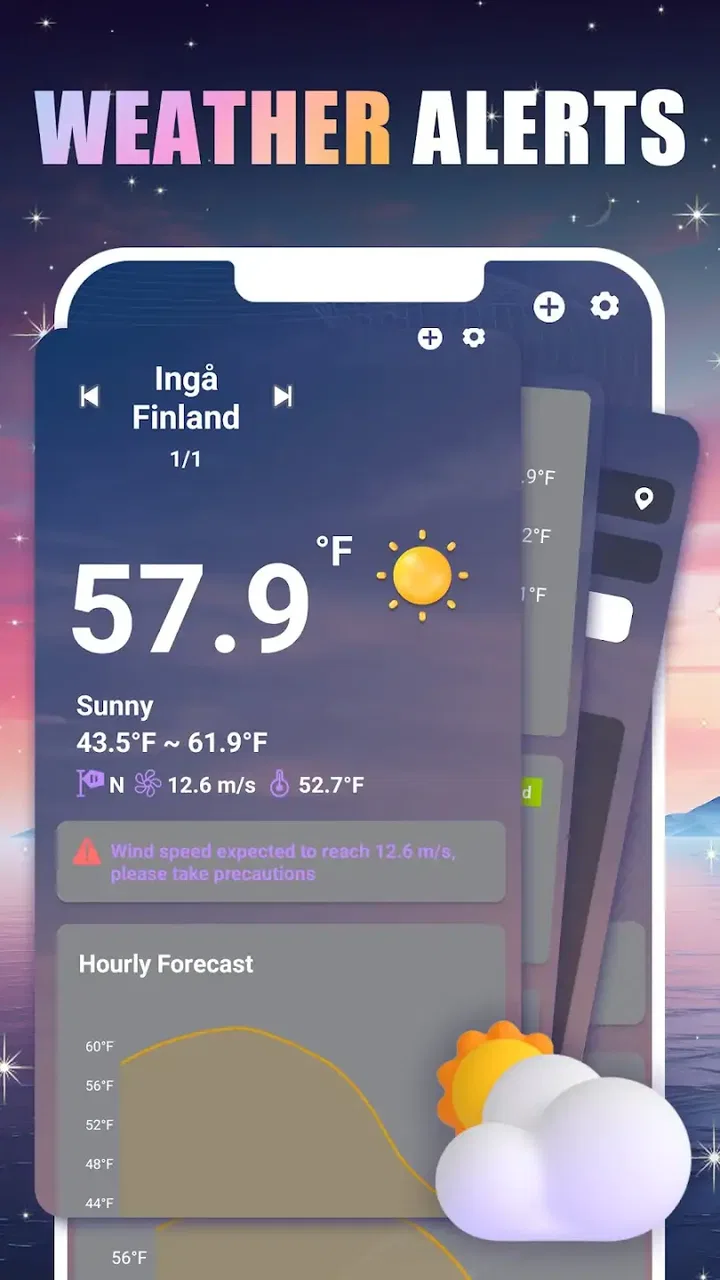
Daily Weather: Weather Radar
- 4.2
- Rating
- 10.00K
- Installs
- Free
- Price
 Analysis by App-foxy
When I open a weather app, I am usually trying to make a small decision quickly: whether to leave now, carry an umbrella, change a walk, or wait before starting a trip. Daily Weather: Weather Radar, from WishSand Studio, is built around that everyday need rather than around a complicated meteorology dashboard. It is a free weather app for Android and iOS, aimed at helping me look ahead and prepare with less hesitation.
My first impression is that its appeal comes from simplicity. The short store description is “Daily Weather,” while the broader promise is to help users stay one step ahead of changing conditions. That makes sense for someone who wants a practical check before going outside, not a specialist tool for interpreting atmospheric models. The app has an Everyone age rating, so it is also an approachable choice for households where several people need the same basic weather information.
The best way to judge this app is by following a normal day from the first weather check to the final decision. That workflow shows both where Daily Weather: Weather Radar is useful and where a more established or more detailed alternative may suit you better.
You May Also Like

 AccuWeather: Weather Radar
AccuWeather Review: A Quick, Clear Forecast for Everyday Decisions
For everyday plans, the best forecast is the one you can understand quickly. AccuWeather makes rain timing, radar, and local conditions easy to act on, with a few trade-offs.

 Hill Climb Racing
Why Hill Climb Racing Still Turns Crashes Into One More Run
A tiny car, a bumpy hill and one more upgrade: Hill Climb Racing keeps resurfacing because its simple chaos makes every near-miss feel personal.

 AliExpress - Shopping App
AliExpress Makes Global Shopping Feel Personal, but Shoppers Bear the Risk
AliExpress turns a global marketplace into a pocket-sized discovery engine. Its reach is useful, its shopping loop compelling, and its trade-offs easy to miss.

 Lords Mobile: Kingdom Wars
Lords Mobile Is a Kingdom-Building Routine, Not a Quick Match
A case-by-case verdict on the building, battles, device demands, and social commitments that make Lords Mobile rewarding for some players and exhausting for others.

 PDF Scanner app - TapScanner
TapScanner Makes Paperwork Easier to Capture, Check, and Share
TapScanner makes scanning with a phone feel less like a rescue operation and more like a dependable step in getting work done. Its capture tools are useful, though not flawless.

 Block Blast!
 Shows How Much a Puzzle Game Can Leave Out
A quiet grid game shows why puzzle players increasingly value instant clarity, repeatable skill and low-pressure play—and where the genre still needs to catch up.
More From Our News Desk
View All News


From a quick forecast check to a real decision
I find the most useful weather check is the one that changes a decision before I am already out the door. This section follows that small but important shift: from looking at conditions out of habit to using a forecast and radar context to choose when, where, or how to go. It also sets up the practical question of how to make those checks fit naturally into a shared household routine.
Starting with the situation you actually have
Imagine I am getting ready for work and need to walk to a bus stop. I do not necessarily need a long forecast discussion. I need to know whether the conditions are likely to interfere with that short trip, and whether the weather may change before I return. This is the kind of starting point where a daily weather app earns its place.
I would begin by opening Daily Weather: Weather Radar and checking the location relevant to the decision. That might be home in the morning, the office during lunch, or a destination before leaving for it. The useful habit is to treat the app as a decision aid rather than as something I browse without a purpose. A forecast becomes more helpful when I connect it to a specific action: walking, cycling, shopping, taking children outside, or planning outdoor work.
Because the app is free, there is little commitment involved in trying it alongside the weather tool already on my phone. That is important for this category. Many people already have a built-in weather widget, so a separate app must save time or present information in a way that feels easier to use. Daily Weather: Weather Radar has a clear opportunity here, especially for users who prefer opening one dedicated weather screen instead of sorting through a general-purpose phone assistant.
Reading the information without overcomplicating it
The next step is deciding how much information I really need. For a short errand, a quick current-condition check may be enough. For a longer outing, I would look further ahead and compare the forecast with the timing of my plans. The practical skill is not simply reading a weather value; it is checking whether the expected conditions line up with the part of the day when I will be outside.
This is where the radar focus matters. A radar-oriented weather experience can be more useful than a static daily icon when conditions are changing nearby. If I am about to leave and see that rain is approaching, the timing of my departure becomes part of the decision. I might leave immediately, wait, or choose a different route. That is a more active use of weather information than glancing at a single symbol and assuming the whole day will feel the same.
I would still avoid treating any forecast as a guarantee. Weather can shift, and a radar view is most valuable when I use it as a current planning aid rather than as a promise about the entire day. For a simple commute, this distinction is easy to manage. For outdoor work or a long journey, I would check again close to departure and keep an alternative plan ready.
The handoff from the app to my routine
A weather app is only useful if the information survives the handoff into real life. After checking Daily Weather: Weather Radar, I still have to act. I may pack a rain jacket, move a meeting outdoors to another time, charge a phone before travelling, or tell another person that plans may change. The app does not make that decision for me, and I see that as a healthy boundary: it gives me information, while I apply local knowledge and common sense.
One practical workflow is to check once when planning, once shortly before leaving, and once again if the activity lasts several hours. That avoids two common mistakes. The first is checking too early and assuming the forecast will remain unchanged. The second is refreshing constantly without turning the information into a decision. With this app, I would use the first check to shape the plan and the later check to confirm whether the plan still makes sense.
For a family, the handoff can be even more direct. One person checks the weather before school, another decides what to wear, and everyone benefits from a shared understanding of the day. Since the app is rated for Everyone, it is suitable as a straightforward household weather option rather than something limited to technical users.
A useful workflow for short trips
Here is how I would use it for a realistic afternoon outing. Before leaving home, I would check the destination rather than relying only on the weather at my current location. I would look at the expected conditions for the time of the outing, then use the radar view to see whether the immediate pattern appears stable or unsettled. If the route involves walking, I would add a few minutes of flexibility instead of planning around the most optimistic timing.
If the weather looks uncertain, I would make the decision reversible. That could mean choosing a café near the planned park, carrying a light layer, or selecting transport that allows me to return easily. This is one of the less obvious strengths of a focused weather app: it can improve planning not by predicting every detail, but by encouraging me to notice uncertainty before I commit to a rigid plan.
On the way back, I would not assume the morning check still applies. Conditions that were harmless earlier may become inconvenient later, especially when the return journey happens at a different time. A second look is therefore more valuable than memorizing the first forecast. Daily Weather: Weather Radar fits this repeat-check habit because its purpose is centered on daily readiness rather than on a one-time setup.
Where it compares well with usual weather alternatives
The usual alternatives are the weather widget included with a phone, a large multi-purpose weather service, or a website opened in a browser. A built-in widget is convenient because it is already visible, but it can encourage a very quick glance without much context. A browser can provide plenty of information, yet opening a page and navigating through it feels slower when I am standing by the door. A larger weather service may offer more layers and specialized data, but that extra depth can also make a simple decision feel unnecessarily busy.
Daily Weather: Weather Radar sits in the middle of those options. It is more intentional than a small widget and potentially more focused than a broad weather platform. I would choose it when I want a dedicated place to check daily conditions and radar-related context without turning a short question into a research task.
The trade-off is equally clear. If I need highly detailed forecasting for aviation, mountain travel, marine activity, severe-weather monitoring, or professional outdoor scheduling, I would look for a specialist service with tools designed for that purpose. A concise daily weather app should not be judged as though it were a professional forecasting console. Its value is greatest when the decision is ordinary, frequent, and time-sensitive.
What the current release means for a new user
Daily Weather: Weather Radar is currently at version 1.0.1, and the minimum operating system is Android 10 or later. For someone using a recent Android phone, that requirement should be easy to understand before installing. I would check the operating-system version first if I were setting it up on an older device, particularly if the phone has not received updates for a long time.
The app was released on April 21, 2026, and it has reached over ten thousand installs. Its average rating is 4.2 from 55 ratings, with 12 written reviews. I read those figures as an early signal rather than as a final verdict: enough people have tried it to show interest, but the user base is still modest compared with long-established weather platforms.
That smaller footprint can be a positive for someone who wants to try a newer, focused option without paying. It also means I would keep expectations sensible. A newer app may feel clean and direct, but long-term habits, broad location coverage, and mature forecasting tools are areas where established competitors often have an advantage.
Small habits that make the app more useful
My first tip is to connect every check to a time and place. Looking at the weather for home when the real decision concerns a destination can lead to poor planning, even if the app displays the information correctly. I would make the destination the focus whenever the trip is more than a short walk away.
My second tip is to use radar information for timing, not just for curiosity. If I see a nearby change, I would ask whether leaving now improves the situation or whether waiting is safer and more comfortable. This turns the display into a simple action plan. It also helps avoid the habit of assuming that a rainy-looking day means every hour will be equally wet.
My third tip is to create a backup before an uncertain activity begins. If I am planning a picnic, sports session, or outdoor appointment, I would decide in advance what condition would make me change plans. That threshold might be heavy rain, strong wind, or simply a forecast that becomes too uncertain. The app can support the check, but the useful outcome comes from deciding what I will do with the result.
A fourth, less obvious point is to avoid checking only when the weather is dramatic. Daily use is often more valuable on ordinary days because it builds a reliable routine. When I know the expected conditions before leaving, I can make small choices about clothing, transport, and timing without repeatedly interrupting the day later.
Where the workflow can break
The first point of friction is the gap between a forecast and the exact conditions I experience. A radar view can help me understand nearby movement, but it does not remove local variation. A short distance, a change in elevation, or a fast-moving system can make the real situation differ from what I expected. I would therefore use the app confidently for routine planning but more cautiously when safety depends on precise conditions.
The second weakness is that a focused daily app may not replace every tool I already use. If I want extensive historical information, specialist warnings, detailed maps, or a broad set of measurement layers, a more comprehensive weather service may be better. Installing this app does not automatically make those other tools unnecessary.
The third issue is workflow discipline. A user who checks one screen once and then ignores the weather for the rest of the day may not gain much from any radar-based tool. The benefit appears when I make a habit of checking at meaningful transition points: before leaving, before starting an outdoor task, and before returning. That is useful advice, but it also shows that the app cannot compensate for careless planning.
There is another practical limitation for people who prefer zero learning. Even a simple weather app requires me to interpret what I see and decide how much confidence to place in it. Someone who wants a single automatic notification and no further interaction may prefer a built-in widget or assistant. Daily Weather: Weather Radar is a better fit for users willing to open the app and make a quick judgement themselves.
Who should install it and who should skip it
I would recommend it to someone who wants a free, dedicated way to check daily weather and radar context before ordinary activities. It makes particular sense for commuters, walkers, parents organizing outdoor plans, cyclists who can adjust departure times, and anyone who dislikes relying on a tiny widget with limited context. The Everyone rating also makes it a sensible option for a shared family device.
I would be more cautious about recommending it as the only weather resource for people whose work or hobbies depend on specialized forecasting. Hikers planning exposed routes, boaters, pilots, emergency planners, and outdoor crews may need a deeper service with information tailored to their risks. The same applies to users who already have a trusted weather app that provides exactly the detail they need with less switching.
For Android users, the minimum requirement of Android 10 keeps the compatibility question straightforward. For iOS users, the app is positioned as a mobile weather option as well, but the most important decision remains the same: whether its focused daily workflow matches the way you plan. I would not install it merely because it is free; I would install it if I wanted a separate, repeatable weather-checking routine.
My final take after following the whole process
Daily Weather: Weather Radar succeeds when I use it for the job it appears designed to handle: moving from a quick weather question to a practical everyday decision. Its strongest role is not replacing every forecasting tool. It is helping me pause before leaving, look at the conditions that matter, and adjust a plan while adjustment is still easy.
WishSand Studio has made a weather app that is approachable, free, and focused enough for routine use. The early rating of 4.2 and the growing install base suggest that it has found an audience, although its relatively recent release means I would still evaluate it alongside my existing weather habits rather than abandoning them immediately.
I would recommend giving it a trial if your weather needs are simple but frequent. Use it before a commute, check the destination for an outing, revisit the radar when timing matters, and keep a backup plan when conditions are uncertain. If that workflow feels natural, the app can become a useful daily companion. If you need specialist forecasting, extensive historical detail, or a fully automated experience, a different weather service will probably serve you better.
FAQs for Daily Weather: Weather Radar
01What features does Daily Weather: Weather Radar offer?
Daily Weather: Weather Radar provides real-time weather updates, detailed forecasts, and interactive radar maps. Users can receive alerts for severe weather conditions, track storms, and view hourly and weekly forecasts. The app also offers customizable widgets for quick access to weather information on your home screen.
02Is Daily Weather: Weather Radar free to use?
Yes, Daily Weather: Weather Radar is free to download and use. However, it offers in-app purchases and a premium version. The premium version provides an ad-free experience and additional features like advanced radar layers and extended forecast details. Users can choose based on their needs and preferences.
03How accurate is the weather information provided by the app?
Daily Weather: Weather Radar sources its data from reliable meteorological services, ensuring high accuracy in weather predictions. It updates frequently to deliver current conditions and forecasts. While no weather app can guarantee 100% accuracy, this app is known for its reliability and detailed information.
04Does Daily Weather: Weather Radar support multiple locations?
Yes, the app allows users to track weather conditions for multiple locations. You can easily add and switch between different cities or regions, making it convenient for users who travel frequently or wish to monitor weather conditions in various places. This feature is particularly useful for planning trips or checking on family and friends.
05Is Daily Weather: Weather Radar available for both Android and iOS?
Yes, Daily Weather: Weather Radar is available for download on both Android and iOS devices. You can find it on the Google Play Store for Android and the Apple App Store for iOS. The app is compatible with a wide range of devices, ensuring accessibility for most smartphone users.
Pros
- Accurate real-time weather updates
- User-friendly interface
- Customizable weather alerts
- High-resolution radar maps
- Minimal battery consumption
Cons
- Limited features in free version
- Occasional ad interruptions
- Requires stable internet connection
- No offline mode available
- Location tracking required

Daily Weather: Weather Radar
Gallery